The Invisible Space Generator lets you copy blank characters that look like empty spaces but are actually part of the text. You can use them to separate a clan tag from your nickname, experiment with a blank gaming name, or add unusual spacing to a bio or profile.
If you've ever tried putting a normal space in a Free Fire or PUBG nickname, you may have noticed that the game removes it or refuses the name. That's why players look for an invisible space they can copy and paste instead of using the spacebar.
NickFinder gives you several options, including large spaces, small gaps, zero-width characters and ready-made ghost name combinations. You can copy a single character or use the nickname builder to put everything together before trying it in your game.
No account or separate app is required. Just choose a space, copy it and test whether the platform accepts it.
How to Use the Invisible Space Generator
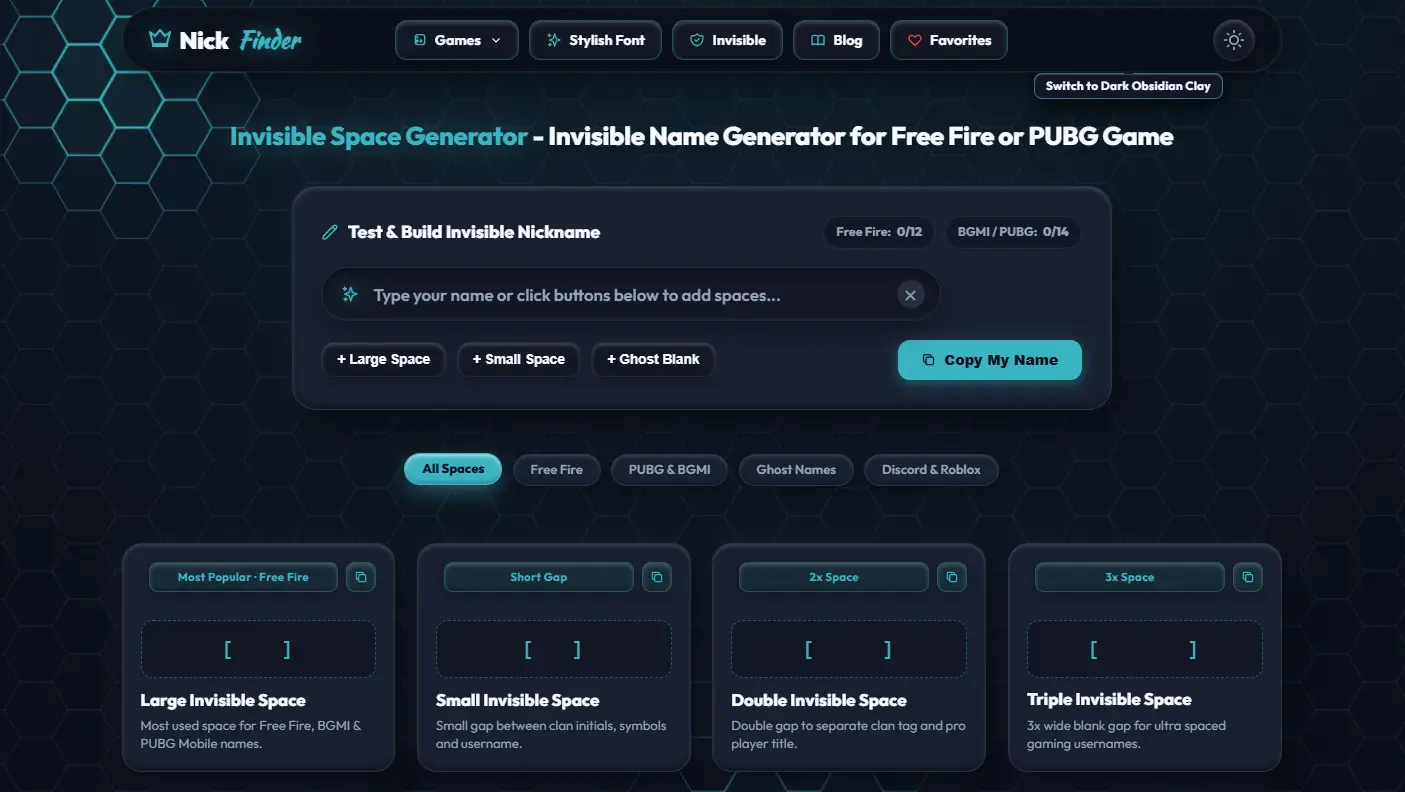
There are two ways to use the tool. You can copy an invisible character directly from a card or create a nickname with spaces already added.
Method 1: Copy an Invisible Space
If you only need a blank character, this is the quickest option.
- Scroll to the invisible space cards below the nickname builder.
- Choose Large Invisible Space, Small Invisible Space, or another gap that suits your needs.
- Click the copy icon on the card.
- Open the game, profile or text field where you want to use it.
- Paste the copied character and check the result.
The preview on each card shows where the blank character sits. The brackets are there to make the otherwise invisible space easier to locate; they aren't necessarily part of what gets copied.
You can also use the category filters to find spaces for Free Fire, PUBG & BGMI, Ghost Names, or Discord & Roblox.
Method 2: Build an Invisible Nickname
Want to put an invisible gap inside an existing gaming name? Use the Test & Build Invisible Nickname box at the top.
Step 1: Enter your name or clan tag in the text field.
Step 2: Position the cursor where you want the gap.
Step 3: Choose Large Space, Small Space or Ghost Blank to add an invisible character.
Step 4: Check your nickname in the editor and remove anything you don't want.
Step 5: Click Copy My Name and paste it into the game.
If you're trying to create an entirely blank nickname, you can start with an empty field and add one of the ghost characters.
The two counters at the top show reference limits of 12 for Free Fire and 14 for BGMI/PUBG. They're helpful while building a name, but the game itself decides the actual allowed length and characters.
Don't confirm a paid name change until you've checked the result in the game's rename field.
Invisible Space Copy Paste – What's Actually Being Copied?
An invisible space might look like nothing, but it isn't the same as an empty text field.
It's a Unicode character with a particular purpose. Some occupy visible spacing without drawing a normal letter. Others have no visible width at all.
This makes them different from pressing the spacebar.
A regular keyboard space is U+0020. Many games remove ordinary spaces from nicknames or don't allow them in certain positions.
Other Unicode characters may be handled differently, which is why people use an invisible character copy and paste tool.
Here are three commonly discussed examples.
| Unicode | Character name | How it behaves |
|---|---|---|
U+3164 |
Hangul Filler | A character that often appears as a wide blank |
U+FFA0 |
Halfwidth Hangul Filler | A compatibility character that can appear as a narrower blank |
U+200B |
Zero Width Space | An invisible character that normally adds no visible width |
You don't need to memorise these codes to use NickFinder. They're useful to know when you're trying to understand why one blank character works differently from another.
Also, two characters that look identical aren't necessarily the same.
A game may accept one, remove another, or reject both.
Unicode 3164 – Hangul Filler Invisible Character
Unicode 3164, officially called the Hangul Filler, is one of the characters commonly mentioned in tutorials about blank gaming names.
Its code is U+3164, and it can appear as an empty area rather than a visible letter.
That's why people searching for Unicode 3164 copy paste often want to use it in Free Fire names, clan tags or other profile text.
However, Hangul Filler wasn't originally created for gaming usernames. It's part of Unicode's support for Korean writing.
Games also don't have to accept it. Some may reject the character or remove it when validating a nickname.
If you're using a blank-character tool, treat Unicode 3164 as one possible option rather than a guaranteed way to create an invisible name.
Large, Small, Double and Other Invisible Spaces
The tool includes several cards because different kinds of spacing are useful in different situations.
Large Invisible Space
The Large Invisible Space card is a good starting point if you want a noticeable gap between two parts of a nickname.
For example, you might want to separate a short clan tag from the actual player name.
A wider gap makes the two parts easier to distinguish, provided the game accepts the character.
The card is also labelled as a popular Free Fire option, but you should still test it before using a rename card.
Small Invisible Space
Sometimes a wide gap makes a nickname look awkward, especially if it already contains wings or brackets.
The Small Invisible Space option gives you a more compact alternative.
Try it between a clan tag and a name, or beside a symbol that sits too close to the letters.
If you're searching for a small invisible space to copy and paste, start here before trying a larger gap.
Double Invisible Space
A double invisible space contains two blank characters or spacing elements in a sequence.
It's useful when you want a wider separation than a single gap provides.
For instance, you may prefer extra room between a clan tag and your player name.
Remember that using two characters can affect the nickname length, even if the result just looks like a larger blank.
Triple Invisible Space
The Triple Invisible Space card offers a longer sequence.
It's intended for names where you want extra spacing, although large gaps are not always practical in games.
If the nickname becomes too long or doesn't look right in the lobby, go back to a smaller option.
Medium Invisible Space
Medium Invisible Space provides another choice between the smallest and widest-looking gaps.
You can try it in a gaming nickname, a short profile description or a decorated name.
The best option depends on how the receiving app displays the character.
Wide Invisible Space
The Wide Invisible Space option is useful when you want more separation in a bio, status or other text field.
It can help with simple decorative layouts, but don't rely on it to create exact alignment.
Different apps and fonts can display the same character at different widths.
Tiny Invisible Space
Tiny Invisible Space is useful for small adjustments.
If you've made a nickname with wings, crowns or other symbols, a tiny gap may help separate the decoration from the letters without making the whole name look stretched.
It's worth trying before adding a full-width blank.
Hidden Space (Zero Width)
A zero-width character is different from the other spacing options.
It can sit between visible characters without creating an obvious gap.
That's why people sometimes search for a zero width space copy paste tool when they want to experiment with text that looks unchanged.
Some platforms remove or normalise these characters, especially in usernames.
Use the Hidden Space card to test the behaviour, but don't assume it can make an unavailable name valid or bypass a game's naming restrictions.
How to Add Invisible Space in a Free Fire Name
Free Fire is one of the main reasons players search for invisible spaces.
Maybe your clan tag and player name are stuck together. Maybe you want a different-looking FF nickname. Or perhaps you've seen another player with an unusual gap and want to try something similar.
Here's how to add a space in a Free Fire nickname using the generator.
- Enter the nickname you want in the Test & Build Invisible Nickname box.
- Place the cursor between the words or symbols you want to separate.
- Add a Large Space or Small Space.
- Check how the name looks in the editor.
- Click Copy My Name.
- Open Free Fire and navigate to the nickname-change option.
- Paste your text and check whether the game accepts it before confirming.
If you only need a single FF name space, you can skip the builder and copy an invisible character directly from one of the cards.
Free Fire Invisible Space and Character Limit
NickFinder displays a 12-character reference counter for Free Fire.
That can help you keep a short nickname manageable, but it's not a guarantee that every character will be counted or accepted in the same way by the game.
A Unicode character may use one code point, multiple code units, or additional bytes depending on how it's represented. Games can also apply their own validation rules.
So if you have a name that appears to fit in the counter but gets rejected in Free Fire, try removing a decoration or shortening the original name.
How to Make an Invisible Name in Free Fire
If you're trying to create a completely blank Free Fire nickname, start with the Ghost Name (100% Blank) card.
Copy the blank sequence and paste it into the game's rename field.
The important part is checking whether Free Fire accepts it.
A blank-looking name in a generator doesn't mean it will appear blank inside the game. Garena may reject unsupported characters, and naming rules can change.
If the game asks for a visible character, use a regular nickname rather than repeatedly attempting unsupported blank combinations.
Also, changing an existing Free Fire name may require diamonds or a rename card, so check the final text before confirming.
Invisible Name for BGMI and PUBG Mobile
The same tool can help you experiment with gaps in BGMI and PUBG Mobile nicknames.
A common example is separating the clan tag from the player name.
You might have a short team tag followed by your usual gaming ID, and you want a little more room between them.
Instead of adding several decorative symbols, try a Small or Medium Invisible Space.
If you're looking for an invisible name for BGMI or a blank name for PUBG, you can also explore the Ghost Names filter.
Just remember that a completely blank nickname may not be accepted.
PUBG and BGMI Invisible Space Copy Paste
To try an invisible space in PUBG or BGMI, copy one of the space cards and paste it into the game's nickname field.
If you're making a complete name, use the builder at the top instead.
NickFinder's BGMI/PUBG reference counter displays a 14-character target. Check the actual limit enforced by your game before committing to the change.
BGMI uses Rename Cards for changing an existing nickname. If the pasted text isn't accepted, try a simpler name rather than spending the card on an uncertain design.
For clan names, consistent spacing can be useful, but don't expect every squad member's phone to display unusual characters identically.
Invisible Space for Discord, Roblox and Steam
Invisible characters aren't limited to mobile games.
You may also want to experiment with blank-looking text in a Discord nickname, Steam profile name or other display-name field.
The tool has a Discord & Roblox Blank card and a matching category filter to make those options easier to find.
However, every platform handles special characters differently.
Discord Invisible Space
Discord supports many Unicode characters in display names, including special symbols and spaces.
Server nicknames can also differ from your global display name, depending on the server's permissions.
If you want an invisible space for Discord, try copying a blank character and placing it between two visible parts of your nickname.
An entirely invisible display name may be rejected or handled differently from a normal name, so don't assume that the character will always work.
Discord usernames have separate rules and are more restricted than display names.
Roblox Invisible Space
Roblox has stricter naming rules, and a blank character that works in another app might be rejected.
You can try one of the available spaces when experimenting with a Roblox display name, but Roblox decides which characters are permitted.
The Discord & Roblox Blank card is a suggested option to test, not confirmation that Roblox accepts it.
If the name fails, use a normal readable display name instead.
Steam Blank Profile Name
Steam community profiles allow users to customise their displayed profile names.
Some people experiment with Unicode symbols and spacing to change how those names appear.
If you're trying a blank character in a Steam profile name, check the preview after saving.
This does not change your underlying Steam account name or SteamID.
Invisible Space for WhatsApp, Instagram and TikTok
You don't need a gaming nickname to use an invisible character generator.
Blank text can also be useful for experimenting with spacing in social media descriptions, messages and profile fields.
WhatsApp Blank Text
If you want to send a blank-looking WhatsApp message, you can try copying an invisible character instead of typing an ordinary space.
However, WhatsApp may remove unsupported or whitespace-only input, so a completely empty-looking message isn't guaranteed to send.
You can also test invisible characters in an About line or group description.
For normal conversations, regular spaces and line breaks are generally more reliable.
Instagram Invisible Space for Bio
An Instagram bio can contain short lines, symbols and other decorative text.
Some users try invisible characters to create spacing between words or lines.
If you're looking for an Instagram invisible space to copy and paste, choose a character from the generator and test how it appears after saving your bio.
Instagram may strip certain whitespace characters, particularly at the beginning or end of a field.
Avoid relying on several invisible spaces to align text precisely, because the layout can change between devices.
TikTok Blank Characters
TikTok also has separate rules for usernames and display nicknames.
You can experiment with unusual spacing in fields that support Unicode text, but a blank character isn't guaranteed to be accepted.
Keep your actual username easy to read and find.
Ghost Name Generator – Ready-Made Blank Combinations
The Unclaimed Ghost Names section contains four ready-to-copy combinations.
These are useful if you want to experiment with different invisible character sequences without assembling them manually.
The word "unclaimed" describes the section, but it doesn't mean the tool has checked live username availability inside Free Fire, BGMI or any other game.
Ghost Name #1
The first combination uses a large-space style with an additional hidden character.
You can copy it and test it in a supported nickname field.
It's designed as a gaming-style blank combination, but whether the name is accepted depends on the game.
Ghost Name #2
The second combination uses a different arrangement of smaller and larger blank characters.
It gives you another sequence to test if you're comparing how different invisible characters are handled.
Don't assume two visually identical sequences will always be treated as separate usernames. Some platforms normalise or remove invisible characters.
Ghost Name #3
The third option is a longer blank combination.
It's more suitable for experimenting with extended invisible text than for names with strict length limits.
If the receiving app rejects it, try one of the shorter options.
Ghost Name #4
The fourth combination is presented for Discord and Roblox-style profiles.
You can test it in an appropriate display-name field, but neither platform is guaranteed to allow a completely invisible name.
If you're unsure which combination to choose, start with a shorter one and see how the app handles it.
Make Multiple Invisible Spaces at Once
Sometimes one invisible space isn't enough.
Maybe you're experimenting with a wider gap, testing a text field or creating a block of blank characters for a profile.
The Make Multiple Invisible Spaces tool lets you choose the quantity yourself.
The control starts at five spaces in the displayed interface.
You can click the minus or plus buttons, or move the slider to change the amount.
The preview updates to reflect your selection.
When you're ready, click the copy button to copy the chosen number of invisible spaces.
When Are Multiple Invisible Spaces Useful?
A custom sequence can help you compare different spacing lengths without copying the same character repeatedly.
You might use it for:
- Testing how a game handles several blank characters
- Separating parts of a nickname where supported
- Experimenting with blank text in a bio or description
- Checking whether a platform trims repeated invisible characters
Keep in mind that ten invisible characters can look identical to one while still being a longer sequence.
And depending on the character type, the actual text field may count, trim or reject them differently.
Combine Invisible Spaces With Stylish Fonts and Symbols
If you're creating a decorative gaming name, invisible spaces can help separate the symbols from the letters.
For example, you might want a pair of wings around your nickname without having them pressed directly against the text.
Start with your name in the Stylish Font Customizer.
Choose a font, add your wings or other symbols, and copy the design.
Then paste the decorated name into the Invisible Space Generator and try adding a Small or Tiny Invisible Space where you want extra separation.
You can also do it the other way around: build a name with gaps first, then experiment with decorations.
It's worth checking the result after every major change. Combining several styled Unicode letters and invisible characters can produce a longer sequence than it appears.
Why Your Invisible Name Isn't Working
An invisible character can look perfectly fine in the generator and still fail when you paste it somewhere else.
Here are the most common things to check.
1. The Game Doesn't Accept the Character
Every game has its own rules for allowed nickname characters.
A Hangul Filler or zero-width character might be accepted by one platform and rejected by another.
If the name fails, try a simpler version with an ordinary visible separator.
2. Your Nickname Is Too Long
Invisible doesn't mean it has no effect on text length.
Repeated blank characters can increase the length of the copied string even when nothing appears on screen.
Remove unnecessary spaces and try again.
3. The App Removes Blank Characters
Some apps automatically trim spaces from the beginning or end of a name.
Others may remove zero-width characters or normalise different Unicode forms.
If that happens, pasting the same character repeatedly may not help.
4. Your Name Is Already Taken
Some platforms require usernames to be unique.
Adding a hidden character doesn't guarantee the platform will treat the result as a different name. It may remove or normalise the character before checking availability.
Use the game's supported naming options rather than relying on blank characters to get around its restrictions.
5. The Character Appears as a Square
If you see an empty square or another unexpected symbol, the device or app may not support displaying that character correctly.
Try another blank type or test it in a different text field.
6. The Copied Text Changed
Passing text through a notes app, keyboard or another editor can sometimes change or remove unusual characters.
Try copying directly from NickFinder into the destination field.
If the result still doesn't work, the app may simply not accept that type of text.
Frequently Asked Questions
What is an invisible space generator?
An invisible space generator provides Unicode characters that appear blank or create spacing without displaying an ordinary visible letter. You can copy them into supported names, bios and other text fields.
How do I copy and paste an invisible space?
Choose a space card, click its copy icon and paste the copied character into the text field where you want to use it. You can also build a complete nickname with spaces using the editor at the top.
How do I make an invisible name in Free Fire?
Try copying the Ghost Blank or another invisible character into Free Fire's nickname field. The game may reject blank-only names, so check whether the character is currently supported before confirming a name change.
What is Unicode 3164?
U+3164 is the Hangul Filler, a Unicode character that often appears as a blank area. It's commonly mentioned in invisible nickname guides, but games aren't required to accept it.
What's the difference between U+3164 and U+FFA0?
U+3164 is Hangul Filler, while U+FFA0 is Halfwidth Hangul Filler. They're related Unicode characters but may have different spacing or compatibility behaviour depending on the application.
What is a zero width space?
A zero width space, U+200B, is an invisible Unicode character that normally doesn't occupy visible width. Some applications remove or restrict it.
Can I use an invisible space in BGMI and PUBG Mobile?
You can try copying an invisible character into the nickname field, but acceptance depends on the game's rules. A space that works in another app may not work in BGMI or PUBG Mobile.
Can I create a completely blank gaming name?
The generator provides blank-character combinations, but whether a game permits a fully invisible nickname depends on its naming rules.
Why does my invisible space disappear after pasting?
The receiving app may trim spaces, remove unsupported Unicode characters or normalise the text. Try another character type or use a normal visible separator.
Can I copy more than one invisible space?
Yes. The Make Multiple Invisible Spaces section lets you adjust the number of spaces using the slider or plus and minus buttons, then copy the resulting sequence.
Do invisible spaces count as characters?
They are real Unicode characters, but the way a platform measures or validates text length can vary. Check the final result in the app.
Can I use invisible spaces in Instagram and WhatsApp?
You can try them in supported text fields, including some bios and descriptions. However, blank-only text may be removed or rejected.
Are the ghost names really unclaimed?
The tool provides ready-made ghost name combinations, but it doesn't verify whether a name is available on a gaming platform. You'll need to check availability in the game itself.
Is the Invisible Space Generator free?
Yes. You can copy the available invisible characters and use the nickname builder without creating an account.
Copy an Invisible Space and Try It
Start with a Large or Small Invisible Space and see how it looks in your nickname. If you need more control, use the builder to add gaps exactly where you want them.
You can also explore the Ghost Names section or create a custom sequence with the multiple-space tool.
Once you've copied the text, paste it into your game or profile and check the result. The generator gives you the characters; the app you're using decides which ones it accepts.
Explore Curated Nicknames & Gaming Hubs
Ready to apply your styled text? Check out our 12,000+ curated gamer identities and game-specific hubs: